The kitchen screen that deals tarot.
Witches Brew Coffee Co. needed a kitchen display. Off-the-shelf options wanted $228 a year for a cloud screen that knows nothing about the shop. So we built them their own: a real-time order board, a thermal printer that slips a tarot card in with every drink, and a scan-to-reveal page that turns a coffee order into a reason to come back. Nothing like the tarot system has been done in a café before.
Watch a service window
A real stretch of the board, uncut. Every card carries a live timer that recolors as the order ages: green under five minutes, amber past five, red past seven. Watch the barista clear the oldest order one drink at a time, tap Rose Garden Ritual to pull up its recipe mid-rush, bump the next order, and then two fresh tickets land on their own. HOT and ICED pills, milk choices, sizes, and For Here/To Go badges ride in from the register automatically.
Notice the order headers: Marcus and Priya have already scanned their tarot slips, so their cards (Death and Temperance, the deck has jokes) show right on the board. Sam's still reads “waiting on scan.” That's the tarot system, and we'll get there.
How an order travels
The barista rings up a drink on the shop's Shopify register. A small program on a Mac Mini behind the counter checks for new orders every five seconds, filters out the noise (tips, retail items, modifier rows), and pushes the order onto an iPad over the café's own network.
That last part matters: the whole system runs on the shop's LAN. No cloud account, no per-screen subscription, no “service degraded” email from a vendor three time zones away. If the internet hiccups mid-rush, orders already placed keep flowing to the kitchen and the printer, because none of it ever leaves the building.
The slip: every order draws a card
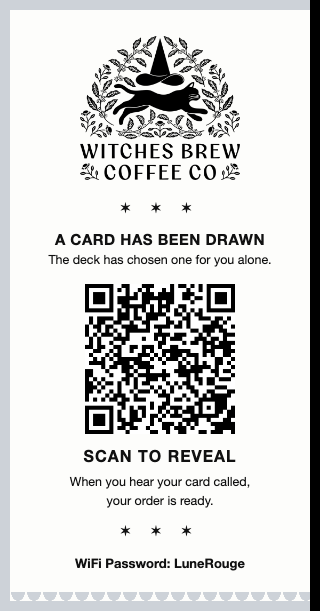
When an order is parked for payment, the thermal printer fires this slip. The system deals one of 22 Major Arcana cards, chosen by order number so the rotation is fair and nobody can fish for The Sun.
Notice what the slip doesn't say. No card name. No drink list. Just “a card has been drawn” and a QR code. The reveal is the whole point, so the printer keeps the secret: the only way to learn your card is to scan. That little moment of theater costs the shop a half-inch of paper and does more for repeat visits than any punch card we've seen.
The slip even talks back to the kitchen: the moment a customer scans, the order's header on the KDS flips from “waiting on scan” to their card, live, so the team knows the magic landed.
This is the real slip, rendered byte-for-byte from the printer code: logo, the draw notice, the QR, the call-out, and the guest WiFi password at the bottom.
The reveal: connection, reviews, and a quiet safety valve
The card flips on the shop's own website with the art, the card's meaning, and the customer's call name (orders are called by card, not by “Jessica? Large oat?”). It feels personal to the business because it is: every piece was drawn, written, and wired for this one café.
Two more things happen on that little page, and they're where the business value lives.
The loyalty signup, timed politely
Twenty-five seconds after the card flips, once the customer has actually read their fortune, a quiet invitation slides up: join the shop's list. Two fields and a skip button. An earlier version asked at twelve seconds and customers dismissed it mid-read; moving it to twenty-five fixed that. Patience is a feature.
The signups feed the shop's own newsletter and SMS list, not a third-party marketing platform. And the page remembers who already joined, so regulars never get nagged twice.
The heart that sends a Google review
Below the card sits one question: “how was your visit?” Tap the heart and the page says thank you, then drops a single button straight to the shop's Google review page. One tap, on the phone they're already holding, at the exact moment they're happiest.
Google reviews are the single highest-leverage signal in local search, and the hardest thing to get a happy customer to actually do. This collapses it to one tap while the good feeling is still warm. That's the engine behind the shop's wall of five-star reviews.
And the other button, could be better, never goes near a public star. It opens a private note straight to the owners' inbox with the customer's tarot card attached so they can trace the order. Happy goes public; unhappy gets heard.
The tools behind the bar
The same screen the orders land on carries everything a barista reaches for mid-shift, one tap away. No second device, no binder, no laminated card taped to the espresso machine. Here are three of them, recorded live.
The recipe book
Tap the gear, open Recipes, and every drink the shop makes is there, organized by category, with exact builds for each size. The barista in this clip pulls up the Rose Garden Ritual mid-rush: nitro matcha, vanilla, rose cold foam, ounce by ounce. New hire or rusty regular, the recipe is never more than three taps from the order.
Opening and closing checklists
The gear also holds the checklists: opening and closing, split by front-of-house and kitchen, plus a mid-day list. The barista picks their name, then ticks through, and every check is stamped to who did it. Owners can see from the dashboard whether the candles got lit and the POS got refreshed, without standing over anyone.
Recall, for when a drink comes back
Bump an order by mistake, or a customer comes back for the latte that got handed to the wrong person? The recall button keeps the last orders that left the board one tap away. Tap it, pick the order, and it drops right back onto the rail in place. Mistakes are a normal part of a rush; this makes them a non-event.
Why Elixir and Phoenix
The whole system is written in Elixir on the Phoenix framework. That's not a fashionable pick; it's a deliberate one for software that has to run a kitchen:
It stays up
Elixir runs on the BEAM, the runtime built for telephone switches that aren't allowed to go down. Each piece (the order poller, the printer driver, the screen) is supervised: if one crashes, it restarts itself in milliseconds without taking the rest along.
Live screens without the circus
Phoenix LiveView pushes new orders to the iPad over a socket the instant they exist. No JavaScript framework, no app store, no “please refresh.” The iPad opens a URL and stays current for weeks.
One language, whole system
The Shopify poller, the order rules, the tarot rotation, the thermal printer protocol, and the screen itself are one codebase. When a barista reports a bug, there's exactly one place to look.
Cheap to run forever
It all fits comfortably on a Mac Mini that also runs the shop's dashboard. No monthly compute bill. The marginal cost of the kitchen system is the electricity.
The build log
The prototype
A quick Python build proved the idea on a spare port: poll the register, draw cards on a webpage. Good enough to know it was worth doing properly, and exactly where its limits were.
The Phoenix rebuild ships
Rewritten in Elixir and Phoenix LiveView. Five-for-five on launch-day smoke tests, live behind the bar that week. The $228/year kitchen display subscription got cancelled.
Print & Park and the tarot deck
The thermal printer joins the system: park an order, print a slip, deal a card. The 22-card rotation keys off the order number, and the scan beacon flips the KDS header in real time. Recipe book, shift notes, and opening/closing checklists move onto the same screen so the bar has one source of truth.
The outage that made it stronger
Printing stopped one morning. Root cause: a macOS privacy feature was silently blocking the service from talking to the printer after a reboot. The fix moved the whole system to a deeper level of the OS that's exempt by design, and we wrote the postmortem down. It hasn't missed a slip since.
Running every service day
The board runs all day, every day, at 2940 Canal Street in New Orleans. Walk in, order a drink, and the system on this page will deal you a card. That's the demo.