Re-skinning an espresso machine from the inside.
A commercial espresso machine ships with the interface the factory gave you, and that is normally the end of the conversation. There is no theme setting, no SDK, no source. What there is, if you go looking, is an SD card with an image pack and a compiled UI on it. This is the story of reading both, working out their formats from first principles, and rebuilding the machine's screen around a coffee shop's actual brand: cauldrons instead of cups, a chalice for the long pour, a zodiac wheel where the timer ring used to be, and a moon that waxes from new to full while your shot runs.
The finished screen
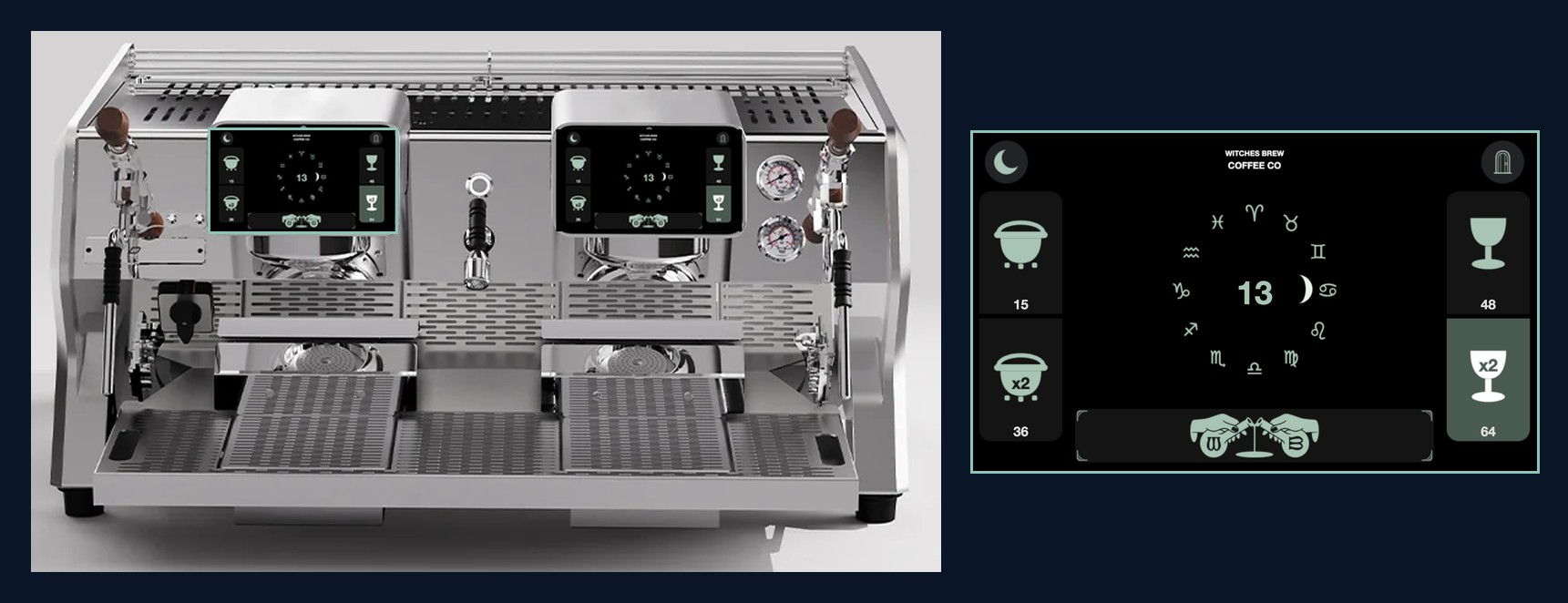
The machine as it ships, running an interface it was never sold with. Both group heads carry it, because the firmware is per-head and everything had to be built twice.
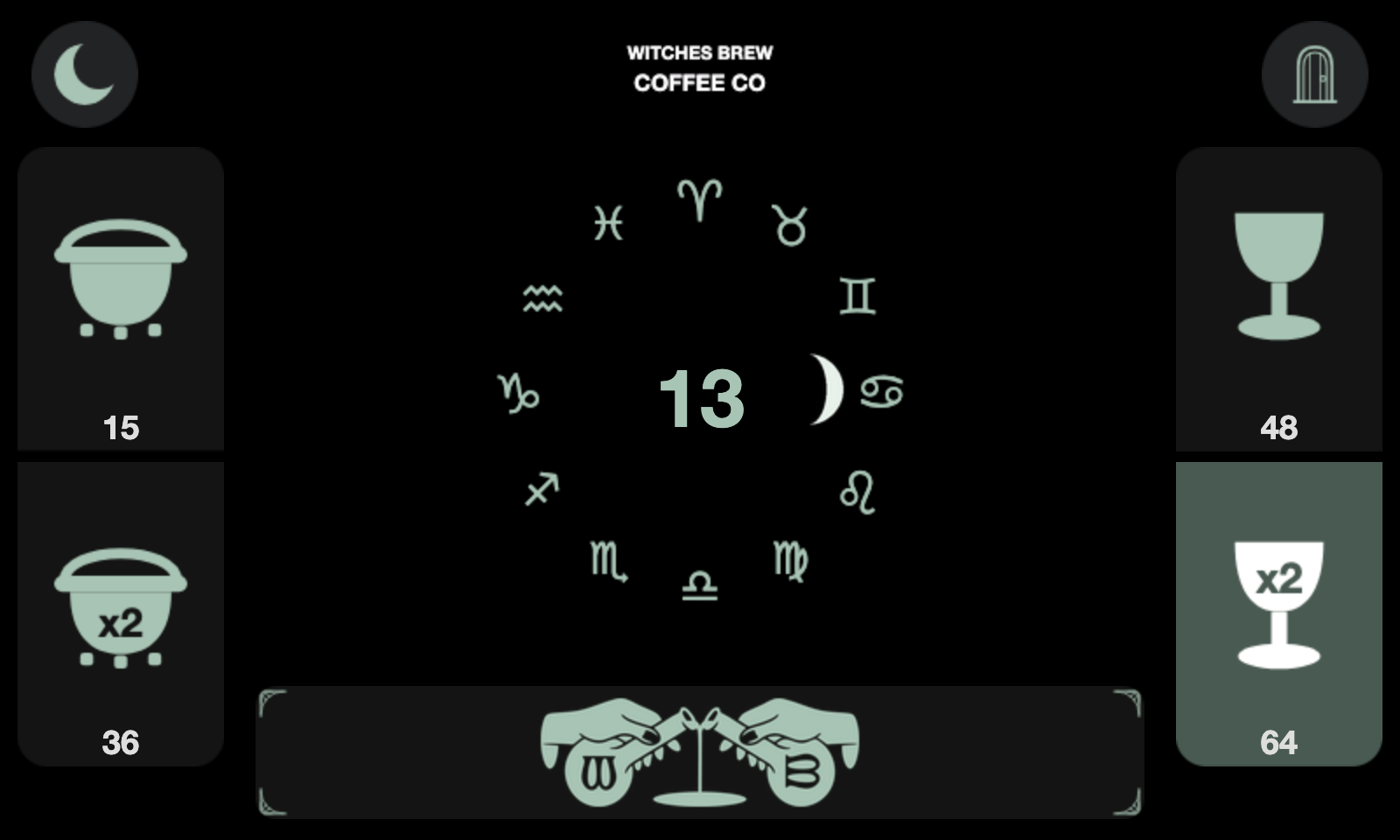
Every element here is a real file that now lives on the machine. Cauldrons select the short shots, a chalice takes the long pour, the shop's logo rides the purge bar, and the crescent in the top left replaced a cog. The dial in the middle is the shot timer.
Nothing about this required permission. It required understanding two binary formats well enough to write into them safely.
Open the pack
The SD card holds an image.bin and an image.idx. The index turned out to be a flat array of sixteen-byte records with no header at all: an id, a type, an offset, width, height, size, and a frame count. Offsets are absolute against a base address, so you subtract it to get a file position.
type 0x10 = a PNG stored whole · 0x04 = zlib RGB565 · 0x20 = animation
The check that proved the format was right: the last record's offset plus its size lands exactly on the file length, to the byte. Not close. Exactly. When a guessed format does that, it is not a guess any more.
Out came 615 images. Buttons, icons, backgrounds, and one 55-frame animation that turned out to be the shot timer.
Cups become cauldrons
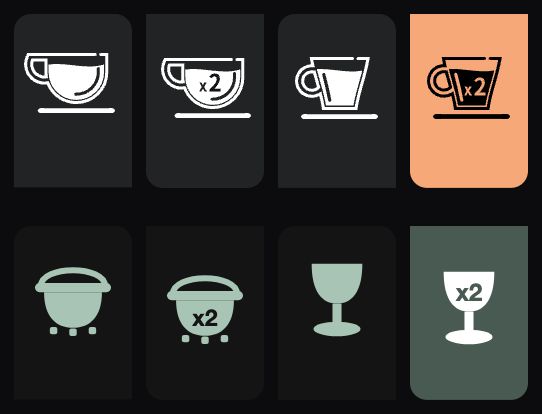
Above, the factory buttons. Below, the replacements. The short shots became cauldrons; the long pours became a chalice, chosen because a tall narrow silhouette reads against a squat one at a glance, which matters when a barista is mid-service and not looking carefully.
The trap here was scale. Our first cauldrons measured 68% of the button's width where the original cups were 76%, and they looked weak next to everything else on the screen without it being obvious why. The fix was to stop eyeballing it and measure the original's ink-to-button ratio, then match it.
There was a second trap, and it cost a flash cycle. There are three separate button sets at three different sizes, one for the main screen, one for the sub-menu, one for the top menu. Change one and the machine looks half-finished in a way that is hard to spot from a photograph.
A dial that keeps time by the sky
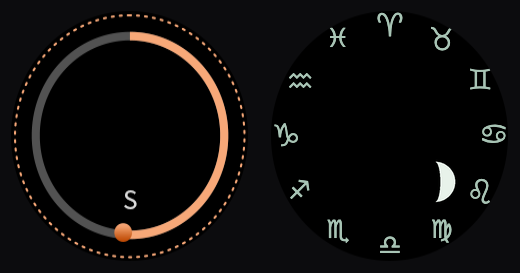
Left, the original: a grey track, an orange arc, and a dot that chases around it. Right, the replacement. The ring is gone entirely. Twelve zodiac houses mark the wheel and a single moon travels it, waxing from new to full as the shot runs.
This works because those 55 frames are not a video. They are a state set, and the machine picks one according to how many seconds have elapsed. That distinction matters more than it sounds: this particular panel sometimes drops frames, and a trail or a comet tail would stutter, because those encode history. A moon phase encodes state. Any single frame is correct on its own, so a dropped frame costs you nothing.
The moon is drawn as a mask rather than a picture. A half-disc plus a terminator ellipse defines the lit limb; the moon's body and its craters are drawn separately and composited through that mask, so the craters clip at the terminator for free.
Twenty-five seconds, in real time
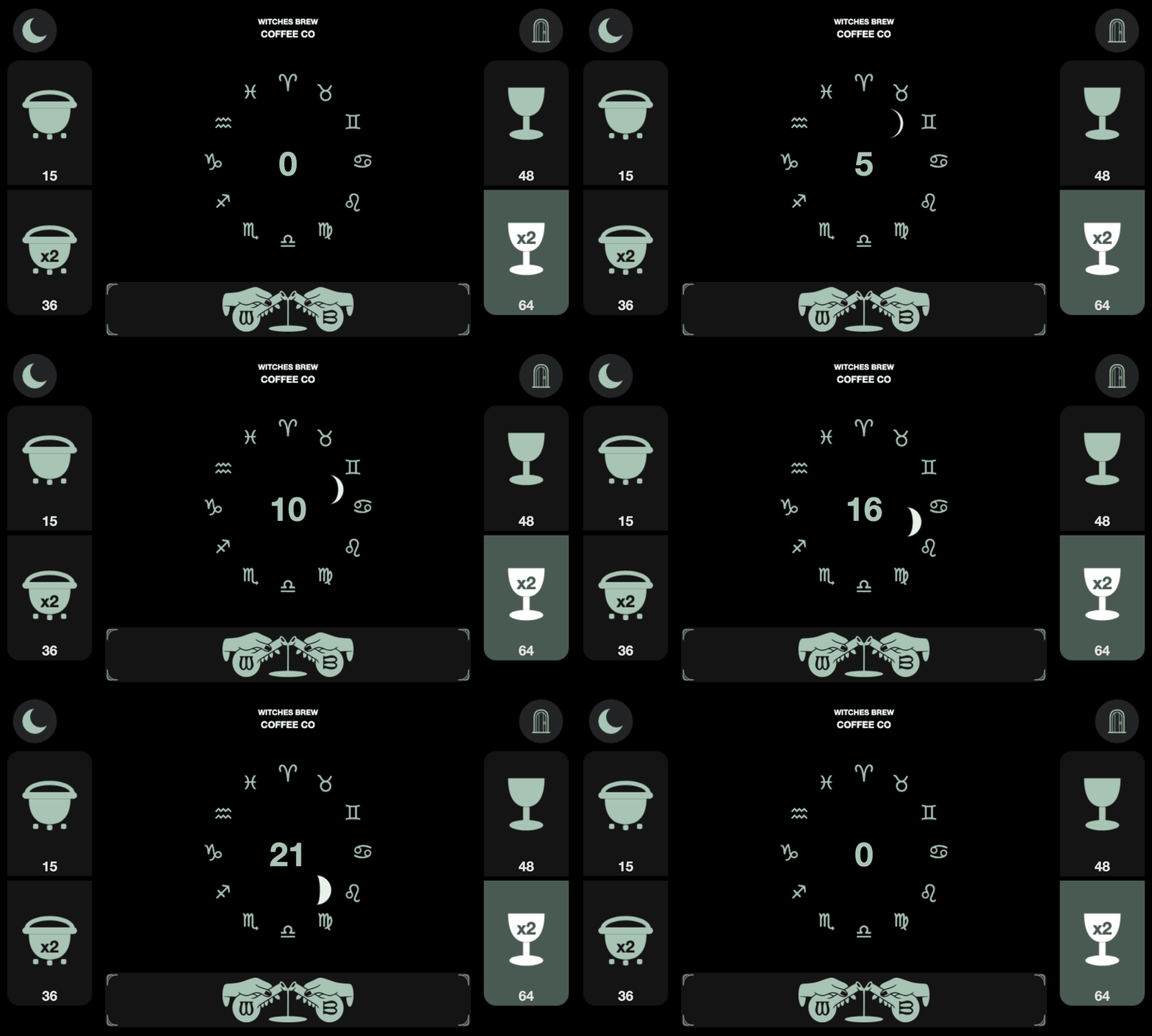
A 25 second double shot, the shop's target time, at one frame per second. The moon starts new, climbs the wheel, and reaches roughly first quarter as the shot lands. Then the dial clears: the resting frame is deliberately blank, so an idle machine shows nothing but the houses.
That last detail was a bug report. The first build blanked the final frame, and the moon still stuck on screen — because the panel rests one frame earlier than we assumed. Both end frames are blank now.
Colour lives in two places, and one of them will hurt you
Recolouring the interface meant chasing the factory orange through baked pixels in the image pack and through colour fields inside the compiled UI file. The second is a two-byte edit; the first is a rewrite.
Two things went wrong here, and both are worth repeating because they are the kind of mistake that looks like success. First: there is more than one orange. Patching the obvious one left the centre timer numeral stubbornly unchanged, because it used a different value. There were four in total, across 216 fields.
Second: an early sweep rotated each pixel's hue while preserving its brightness. That is exactly right for a thin accent line and exactly wrong for a filled button, which came out a pale mint rather than the deep green intended — on 62 of 306 images. The fix was to pick the target colour by role: a large filled area becomes the paint colour, a small mark becomes its light tint.
And the reds were left alone on purpose. They are attached to the fault list — no water, heating timeout, extraction timeout. A green fault reads as a normal machine. That is not a theming decision.
The static screen
The main screen's header was replaced with the shop's name. It came back as television snow.
The first theory was wrong: the image was fine, well formed, correct dimensions, valid PNG. The actual cause was that this one image is not stored as a PNG at all. Its frames are zlib-compressed RGB565 raw pixels, while every other animation in the pack is PNG. Writing a PNG into a raw-pixel slot hands the decoder a file header and asks it to draw it.
The extraction tool had hidden this, because it helpfully decodes both formats out to .png. They looked identical from the outside. The packer now reads each frame's own type byte and encodes to match.
The general lesson, and the one worth carrying to any binary format: a check that confirms your output is well-formed tells you nothing about whether it is well-addressed.
What the machine already knows
Alongside the images sits a name table — 624 variables the machine tracks internally, in Chinese, most of which never appear on any screen. Reading it turned up a lifetime shot counter, cleaning-cycle counts and status, a water-level probe, and the auto on/off schedule.
It also explained a mystery. A small down-arrow with a zero beside it, which nobody at the shop could identify, is the grinder-link adjustment: the machine compares each shot against a target time and tells the barista how many steps to move the grinder, and in which direction. They were not using the feature, so it has been retired.
Working without a safety net
There is no undo on a machine that pulls a hundred shots a day, so the build never edits the firmware in place. It copies the whole payload, modifies the copy, and then verifies before it will declare success: the index tail must land exactly on the file length, every untouched image must come back byte-identical, and the rebuilt files get re-extracted and re-measured rather than trusted.
Those assertions caught two failures that would have shipped silently. One was an assumption that image ids line up between the machine's two brew heads — they mostly do, and then they drift by one partway through, so ids are now matched by content hash instead of arithmetic. The other was a plan to append a scheduled function to the machine's script, which already defined one; in this language the second definition silently wins, and the readout the first one drove would simply have stopped.
Both were found by checks that refuse to proceed rather than checks that print a reassuring line. On a system you cannot test without deploying, that difference is the whole job.
Where it stands
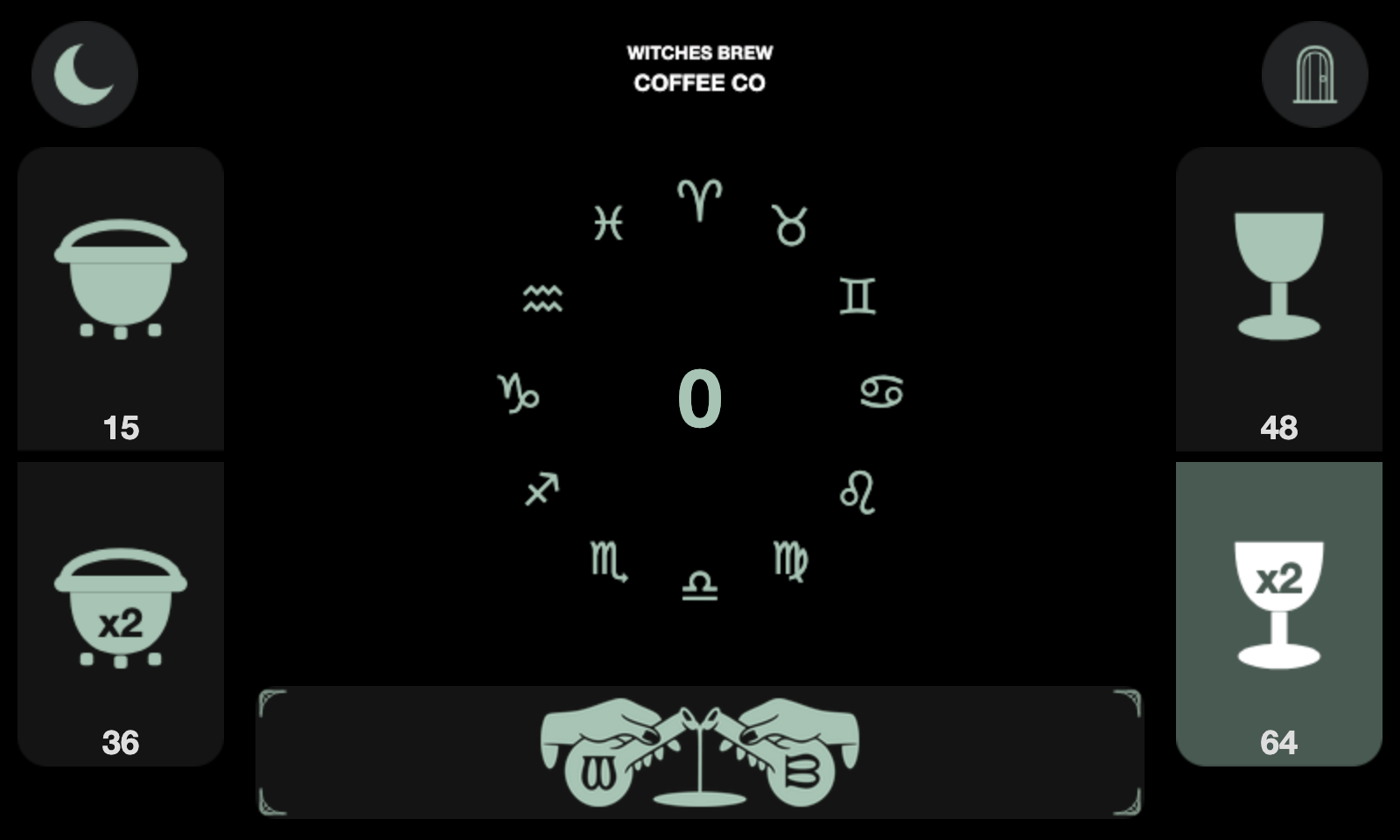
At rest. No moon, no ring, no leftover state — just the houses waiting.
Image pack and compiled UI, both readable
Sixteen-byte index records, three payload types, colour fields at a known offset. Round-trips byte-perfect.
Full re-skin on both brew heads
Three button sets, the timer dial, the header, the purge bar, two top-bar icons, and every orange in the interface.
Driving the screen from script
The vendor's scripting layer can draw a chosen animation frame directly, which would let the interface react to the machine rather than only display it. Being tested carefully, on a machine that has to open tomorrow.